TE MyTime Watcher: A Helpful Extension for Tracking MyTime Submissions
TE MyTime Watcher is a Chrome extension developed by RatOps Group. It is a free add-on that falls under the Browsers category, specifically Add-ons & Tools.
This extension is designed to assist users in claiming their hours in a timely manner. It offers features that track MyTime submissions and provide notifications for missing or incomplete weekly submissions. Additionally, it includes reminders for data validation, especially for those who submit "default" hours in advance.
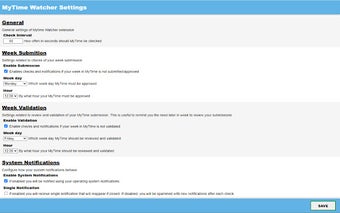
The main features of TE MyTime Watcher include the ability to receive notifications if you haven't submitted your MyTime at a configurable week day and time. It also notifies you to verify your submitted data at a configured week day and time, which is useful for validation purposes by the end of the week.
Furthermore, this extension allows you to use the omnibox keyword "mt" to open MyTime at a specific week or dynamically. For example, you can enter "mt 39" to open week 39 or "mt -1" to open the previous week. Additionally, users can receive system notifications for each deviation and missing data according to their settings, with the added bonus of their supervisor's photo to boost importance.
TE MyTime Watcher provides various configuration possibilities, such as setting the weekday and hour for each check, enabling or disabling each check, determining the frequency of data checks and notification dispatch, enabling or disabling system notifications, and setting the supervisor dynamically or manually along with their email for photo pulling purposes.
Overall, TE MyTime Watcher is a useful extension for individuals who need assistance in tracking and managing their MyTime submissions. It offers customizable features and notifications to ensure accurate and timely submission of hours.

















![Icon of program: Just Fantom Ticker [PRO]](https://images.sftcdn.net/images/t_app-icon-s/p/666e492b-6b68-4d29-9997-e4050e4252dc/2217834968/just-fantom-ticker-pro-logo)